

Making it easy for your patrons to discover the thousands of titles you have in your Comics Plus Subscription has never been easier! Comics Plus provides customers with FREE, INSTANT and 24/7 access to Full and Updated MARC records. Read below for more information.
What is the Process for Obtaining MARC Records?
What is included in the MARC Records?
Can I get Updated Marc Records?
What is the difference between "Full" and "Updated" MARC records?
What do MARC Records look like once integrated?
What do the MARC Records Statuses mean?
What is the Process for Obtaining MARC Records?
Step-By-Step instructions
- Go to: https://my.comicsplus.app/ and log into your Admin Portal
- Click "Marc Records" in the left navigation pane
- *If you have multiple collections, from the drop down menu choose the collection you would like to pull records for
- Click "Request Report" and choose either "Full" or "Update"
- Allow 5-10 minutes for the records to pull. Afterward, refresh your screen and a URL will appear.
- Click on the URL to download your MARC records!
Check out our Admin Portal FAQs for more information.
Do MARC Records Cost Money?
No! Comics Plus MARC records are FREE to subscribing customers
What is included in the MARC Records?
Your MARC records will be specific to your library. They will include only the content you subscribe to - i.e. any disabled titles will not appear, as well as any age content not in your collection.
In the records you will find:
-
Title (245,00,$a)
-
Description (520,$a)
-
Age Rating (521,$a)
-
Interest Labels (650,_0$a)
-
Writer(s) (700,1_$a)
-
Artist(s) (700,1_$a)
-
Link to resource (Subdomain specific - meaning specific to YOUR library!) (856,40$u)
-
Cover Image (URL) (856,40$u)
Can I get Updated Marc Records?
Yes! In the User Admin Portal you can pull either "Full" or "Updated" records.
What is the difference between "Full" and "Updated" MARC records?
Full Marc Records will include all records and metadata in your Comics Plus Collection
The first time you integrate Comics Plus MARC records into your catalog, you will want to be sure to pull "Full" Records.
Updated MARC Records will contain any updates, additions and removals made since your last MARC record pull.
If you have already pulled and integrated your Full MARC records, you only need to use your Updated MARC records moving forward.
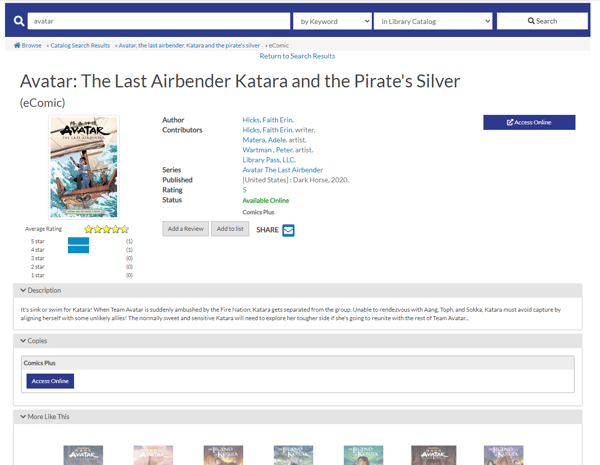
What do MARC Records look like once integrated?
This will vary depending on your ILS and user interface, below you can see an example of an integrated MARC record!
What do the MARC Records Statuses mean?
-
Pending = in the queue waiting to be processed
-
Processing = In process will be completed shortly!
-
Completed = your MARC records are complete!