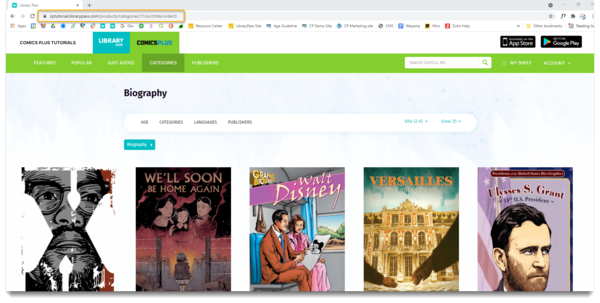
Sharing links to titles and lists within your Comics Plus platform is very easy! Watch the tutorial below or follow the step-by-step instructions to learn how!
Why would I want to share direct links?
When you share a direct link to a title, list or category within your Comics Plus platform, it takes the end user directly to this content! This is a great way to promote certain titles or share relevant lists with teachers, librarians and more!
- Share a title of interest directly with a patron
- Curate your Comics Plus collection outside of the platform using links to direct titles
- Share curiculum focused content directly with teachers
- Link a promoted list to social media/ patron focused outlets
- Share Socail and Emotional Learning titles with Guidance Counselors
How do I share direct links?
Navigate to the title, list or category page you wish to share.
To Share a LIST:
-
On the Featured page locate the list of interest.
-
Click either the name of the list or the "All" button to access the selected list
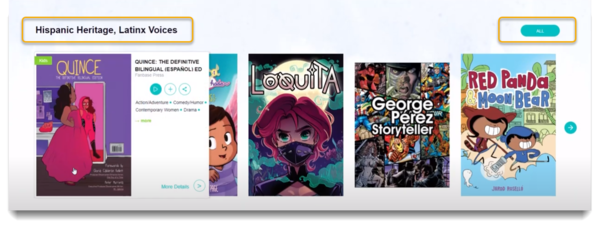
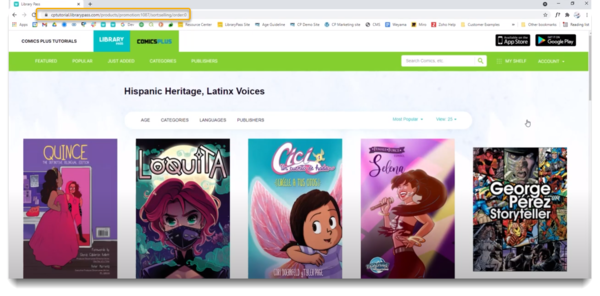
Once on the lists full title page:
-
Ensure your library name is in the top left corner
-
Select the URL at the top of the page
This URL is now ready to share!
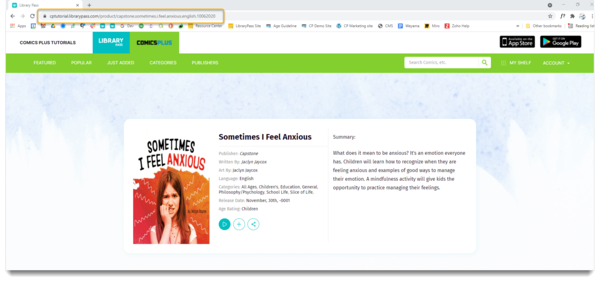
To Share a TITLE:
-
Locate the title of interest within yoru Comcis Plus Platform
-
Click either the cover page or the "More Details" link in the hover options to view the titles summary page

Once on the titles summary page:
-
Ensure your library name is in the top left corner
-
Select the URL at the top of the page
This URL is now ready to share!
To Share a CATEGORY:
-
Click Category in the top navigation bar
-
Locate the category of interest and click to open the titles in your collection within this category
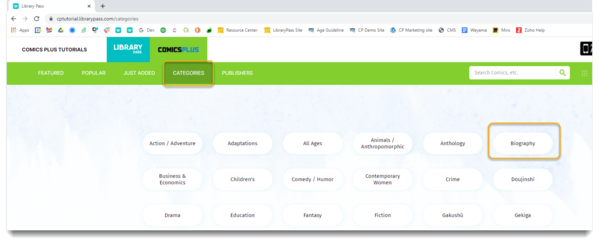
Once on the category's page:
-
Ensure your library name is in the top left corner
-
Select the URL at the top of the page
This URL is now ready to share!